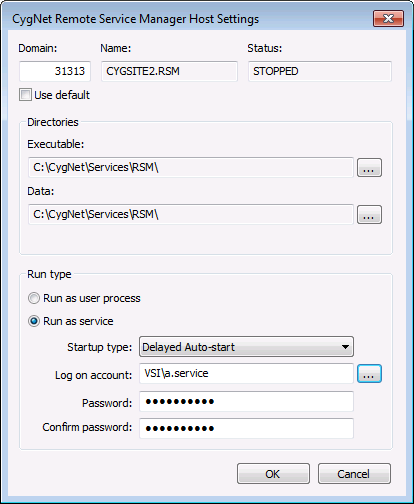
Use the Add or Edit buttons to update your list of RSM configurations in CygNet Host Manager. Adding a Remote Service Manager (RSM) service to CygNet Host Manager requires you to specify the location of the RSM directories to use, the run type details, and domain information. You can also edit an RSM service to change details about those properties.
Note: You must stop the service prior to making any changes.
To Add an RSM to CygNet Host Manager
Notes:
CygNet Host Manager shows only the RSMs that are located under the same CygNet\Services root file location. For example, if you add four RSMs to CygNet Host Manager, and all four are located under CygNet\Services, then all four RSMs will be listed. If all four have separate roots, only one will be listed.
RSM service names must be unique, even if located on different domains. For example, [nnnnn]MySite.RSM, [nnnnn]MyOtherSite.RSM, [nnnnn]MySite2.RSM.
To Edit RSM Properties in CygNet Host Manager
The properties on the CygNet Remote Service Manager Host Settings dialog box are described below. The same properties appear when adding or editing an RSM.
| Property | Description |
|---|---|
| [Remote Service Manager Details] | |
|
The Domain ID for the RSM you are adding. |
|
|
The Site.Service name for the RSM you are adding |
|
|
The operational status of the RSM you are adding. Possible values are RUNNING, STARTING, STOPPING, or STOPPED. |
|
|
Click the check box to select/clear the option to use the default domain for the RSM you are adding. |
|
|
Directories |
|
|
Provide the directory path on the server where the RSM.exe file is located. Use … to select the location. |
|
|
Optionally specify a directory separate from where the RSM executable is located. If located in a different directory, provide the directory path on the server where the RSM data file is located. Use … to select the location. |
|
|
Run Type |
|
|
Select to run the RSM as a user process. When selected, the RSM runs as a command-line process and details are specified via a Command window using command-line parameters. |
|
|
Select to run the RSM as a system service. When selected, additional options become enabled to complete the configuration (see following table entries). Once the details are specified, the RSM runs as a system service and an entry is added to the services management console (for example, CygNet MYSITE.RSM Service). |
|
|
If running as a system service, select the startup type for the system service. Options include the following.
Note: If set to Manual, you must start the service manually when the server reboots. |
|
|
If running as a system service, specify an appropriate log-on account. Click ... to access the Select User dialog box to make your selection. |
|
|
If running as a system service, type a password into the text box. |
|
|
If running as a system service, retype the password to confirm. |
|

|
|
|

